Introducing M-Foundry: An Agentic Workbench for the Supply Chain
The first in a series on M-Foundry — a config-driven, multi-agent, multi-model harness built to help supply chain analysts and continuous improvement engineers do their actual jobs, with a free choice of local and cloud AI models.
In my welcome post I promised a first project: "a new, extendable, multi-agent and multi-model harness focused on monitoring and exploring business processes." This is that project. I've been building it for a while now, it has a name — M-Foundry — and it's far enough along that I can start writing about it properly.
This post is the overview: what M-Foundry is for, what it does, and a first look under the hood. It's the opening post of a series of five — the later posts dig into each of the major pieces in real technical detail. If you'd rather skip the architecture, the first two sections will give you the full picture; if you're here for the engineering, the plumbing section and the posts that follow are for you. This is a personal project, if there is real interest in it I will share it, for other to use and probably share the source. I am keen to discuss this approach with others, both from the practical side of how best to utilize AI for this use case and the underlying AI technology used.
The Objective
The analysis of supply chains often involves digging into multiple applications, pulling data, collecting new data from the operation, closely reviewing SOPs, digging into the real life outcomes and other tasks. I have attempted to make M-Foundry and natural home for these activities facilitation all of of the activities, providing tools to make it easier and using the appropriate AI models when they can add real value.
The exercise of digging in the data and what it means is wrapped in an enormous amount of mechanical fetching, shaping, sharing, and exploring the detail.
Generative AI obviously has something to offer here, but I don't believe the answer is a chatbot in a browser tab. A general-purpose chat assistant can't see your data, can't touch your systems, and forces every piece of context through copy-and-paste.
M-Foundry is my answer: an agentic workbench for the analyst. Think of a tool similar to claude cowork but knows more about the enterprise applications. A small set of design principles drives everything in it:
- Assist the analyst doing their job. The unit of value isn't a clever answer, it's finished work: a query written and run, a detailed report produced, a business case for an improvement built.
- Your choice of model — local or cloud, per agent. A model is a configuration setting, not along term architectural or financial commitment. Sensitive work can run entirely on a local model on your own hardware; heavyweight reasoning can go to a frontier cloud model. You can mix both in the same conversation.
- Connect to the analyst's real resources. Files, spreadsheets, documents, databases, and enterprise systems — the agent operates where the work already lives. But also become a repository of the tools, data and other information the analyst needs.
- Transparent and owned. M-Foundry is a thin harness, not a black-box platform. Every tool call, every model decision, and every stopping condition is visible and logged. When AI acts on business systems, that's not a nice-to-have.
The target user shapes all of this. An analyst shouldn't have to become a prompt engineer or a Python developer to benefit — but the platform should be able to extend the system freely. This could mean adding new tools, connecting to new sources of information or incorporating new AI techniques or technologies.
The Requirements
Here are the main features, briefly. Each of these gets explored in more detail later in the series.
Pick your model, per agent. Models are defined once, a tool specific name that you point to the actual model. Today my registry holds a local Gemma running under LM Studio, a local 35B mixture-of-experts model that handles tool calling cleanly, and Claude Opus in the cloud. An agent is pointed to a model, and switching an agent between them is a simple set up change. Any OpenAI-compatible endpoint works, so vLLM or another serving stack slots in the same way.
An agent is a config file. Every specialist agent — its model, system prompt, tools, knowledge sources, context policy, and guardrails — is defined entirely in one YAML file fronted by a user friendly set up screen There is no per-agent code in the engine at all, so building a "warehouse throughput analyst" or a "receiving exceptions investigator" is a configuration exercise.
Real tools: local actions plus enterprise connectors. Agents get local tools for the formats analysts actually use — reading and writing markdown, CSV, SQL, xlsx, and docx, and reading PDFs — plus MCP (Model Context Protocol) connectors to external systems. Every tool is granted per agent against an allowlist enforced by the engine, so an agent can only ever touch what it was explicitly given.
Projects: a real workspace. Work is scoped into projects — server-side folders that hold the chats, files, and automations for one initiative. You drag a spreadsheet into the chat, the file lands in the project, and the agent reads it, analyzes it, and writes results back as new files. It's the difference between talking about your data and working on it.
Processes: scheduled and event-driven automation. Any agent-plus-prompt can be stored as a process and fired on a schedule (cron or interval) or by an inbound webhook — and a webhook can even carry files into the project before the run starts. This is the monitoring half of the vision: overnight exception sweeps, hourly KPI snapshots, and event-triggered investigations, each with a replayable run log. Processes display results on an ephemeral canvas, the same user interface the analyst uses when performing a deep dive into the data.
Grounded in your own knowledge. An agent can pin small, high-value reference documents — a table glossary, naming conventions, business rules — directly into its context, and can query its own private RAG (retrieval augmented generation) index over larger document sets. Knowledge is isolated per agent: the finance agent cannot read the warehouse agent's index, by design, unless you want to then you can configure the agen to have multiple library sources.
A human in the loop, when you want one. Any process can be flagged to require approval: the agent pauses mid-task, you approve or reject from the chat (with a comment the agent actually adapts to), and — because the paused state is checkpointed to disk — the approval can arrive hours later, or after a restart. Results like charts and images can also be pinned to canvases: persistent boards where an analyst arranges outputs into something like a living dashboard.
The Plumbing
A first look at how it's built. This is a deliberate skim — every paragraph here becomes a full post later in the series.
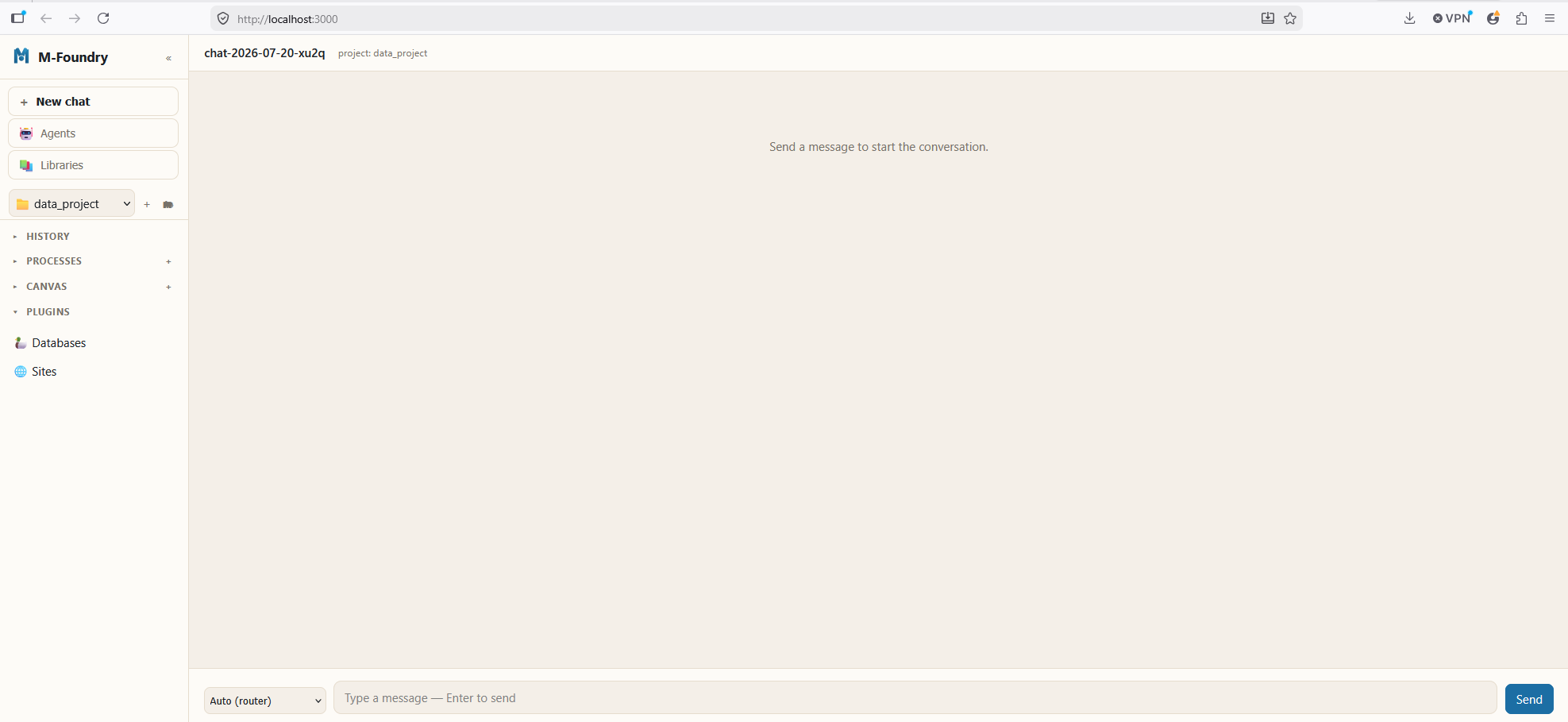
A thin harness, deliberately. The core is a stateless orchestration loop in Python: route the message, run the chosen agent, broker its tool calls, stream the result. All durable state lives in a session store behind an interface, so the persistence back-end can change without touching the loop.
Routing and hand-offs. When a message arrives, a router decides which specialist handles it — a keyword fast-path for the obvious cases, and a cheap LLM classification call over the agents' descriptions for everything else. Agents can also hand work to each other mid-task; the harness (not the agent) validates each hand-off, generates a compact brief for the receiving agent, and enforces a ceiling so two agents can never ping-pong forever.
Context is managed, never accumulated. Each agent in a session gets its own private worker with its own message window, and the harness assembles exactly what the model sees before every call: pinned knowledge first, then history under a per-agent strategy (verbatim, sliding window, or rolling summarization), with strict token accounting so nothing is ever silently truncated. Tool outputs are quarantined per agent — agent A's query results never leak into agent B's context unless the harness deliberately briefs them across. That quarantine is also the choke point for stopping prompt injection riding in on tool output.
One client, many models. A provider-agnostic model client speaks to OpenAI-compatible endpoints (which covers LM Studio and friends, local or not) and to Anthropic's API, with streaming and tool calling on both paths. Finding a local model that reliably emits clean tool calls at usable speed turned out to be one of the more interesting sub-quests of this project — that story gets its own post.
Two interfaces. Everything the engine does is exposed as a typed event stream over HTTP and SSE, and two React apps consume it: a chat UI for the analyst (sessions, projects, processes, approval banners, canvases) and M-Control to manage the tool The whole stack runs from a single docker compose, with the local model server staying on the host.
Where the Series Goes Next
M-Foundry is deliberately a harness — the value is in how these pieces compose against real analyst work, and that's what the rest of the series explores:
- Local vs. cloud, per agent — why model choice should be a setting, running against LM Studio in practice, and the hunt for a local model that can actually tool-call.
- An agent is a config file — the full agent schema, the no-code editor, and grounding agents in your own knowledge with pinned files and user defined RAG repositories.
- Giving agents hands — local file tools, MCP connectors to enterprise systems, projects as workspaces, learning and memory, and the safety rails: allow lists,approvals, and quarantine.
- Automation and monitoring — scheduled and webhook-driven processes, human-in-the-loop workflows, and canvases as living dashboards. What other types of triggers could useful?
As I said in the welcome post: questions, suggestions, and criticism are all welcome — ideas rarely improve in isolation. If you're building something similar, or you're an analyst wondering whether any of this would actually help you, I'd particularly like to hear from you.
More soon.
Enjoyed this? Get the next one.
Occasional emails when I publish new writing on SQL, machine learning, GenAI, and supply chain. No noise.
$ subscribe — new posts & updates, no spam
Double opt-in — you'll confirm by email. Unsubscribe anytime via the link in every email. No spam, ever.