An Agent, a Process and a Canvas
My previous post gave a high level view of some of the features of the M-Foundry harness. This post makes the first group of them more real by actually using them: we’ll create an agent, choose what runs it— a local model or a frontier one — put it to work on a schedule and on a webhook, and end with its results arranged on a canvas that behaves like a dynamically updated living dashboard. One worked example runs through the whole post, and everything shown is a working feature running on my own instance today.
My previous post gave a high level view of some of the features of the M-Foundry harness. This post makes the first group of them more real by actually using them: we’ll create an agent, choose what runs it— a local model or a frontier one — put it to work on a schedule and on a webhook, and end with its results arranged on a canvas that behaves like a dynamically updated living dashboard. One worked example runs through the whole post, and everything shown is a working feature running on my own instance today.
The example: receiving exceptions. Every distribution center has them — PO's that arrive short, over, damaged, or not at all. Imagine analyst who is reviewing these and trying to improve the receiving process. The analyst who starts each morning digging through yesterdays receipts to find the ones that matter. It’s exactly the kind of work I built M-Foundry for: repetitive mechanics wrapped around judgment that should stay human. So let’s build a Receiving Analyst and take the mechanics away from the human.
Creating the Agent
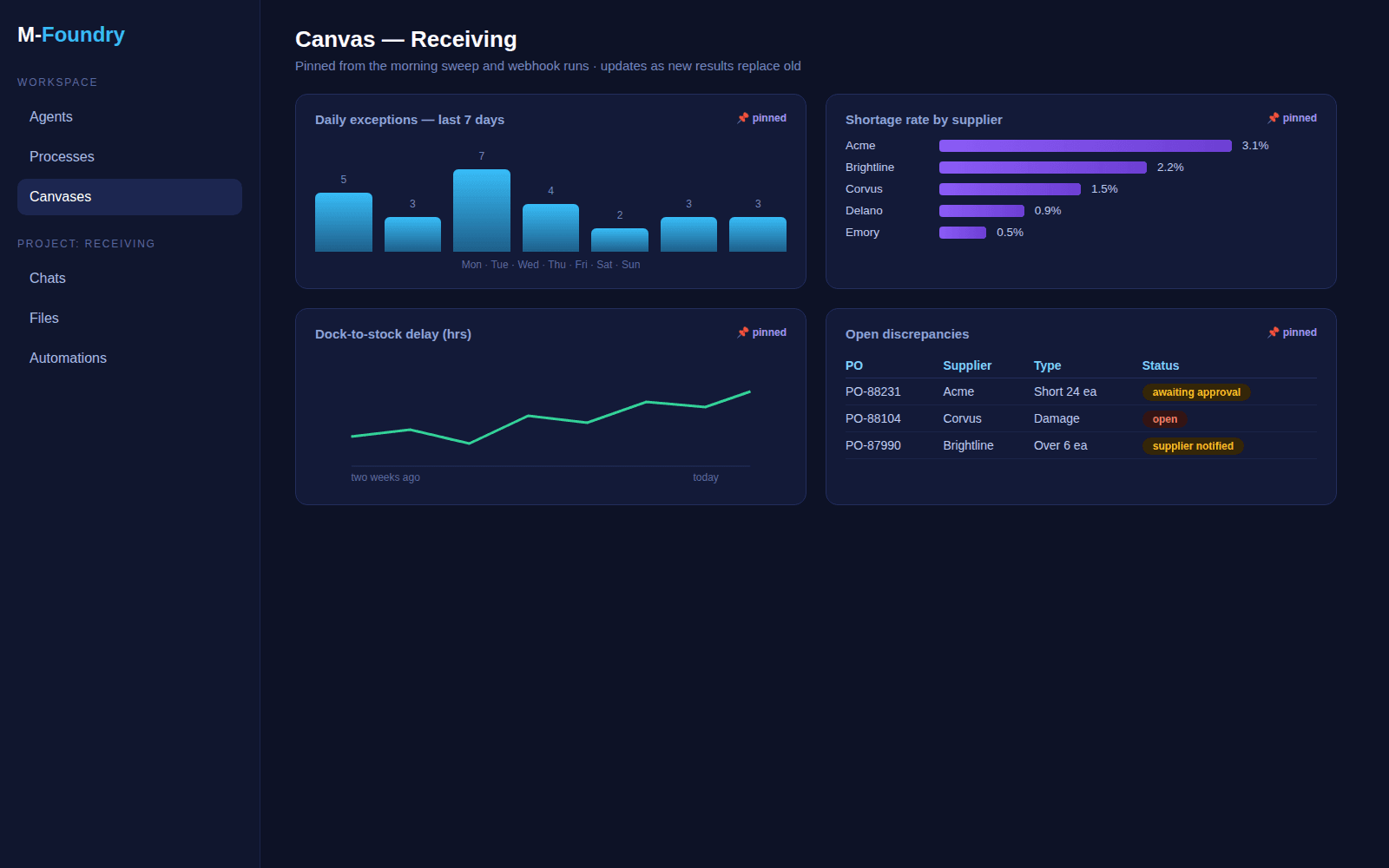
In M-Foundry an agent is a config file. The agent editor fronts the configuration file with a form. Creating the Receiving Analyst takes four decisions:
What it’s called and what it’s for. Name, and a description written with care — “Handles questions about inbound receipts, PO discrepancies, shortages, overages, damage, and dock-to-stock delays.” The description isn’t documentation; the router main chat client reads it to decide which questions this agent should answer, so writing it well is most of the setup.
How it should behave. The system prompt: ground every answer in the company’s own receipts and policies, cite sources, never invent at threshold. A few routing keywords — receiving, PO, shortage, ASN —so the obvious questions route here without a model call at all.
What it may touch. Tools are an allow list enforced by the engine, not a suggestion. The Receiving Analyst gets file reading and writing, SQL against the receipts data, and chart drawing — and can do nothing else.
What it knows. A checkbox links the receiving SOP and the discrepancy-code glossary so answers come back grounded in policy, with citations.These are stored in libraries as raw documents or added to library specific rag databases.
That’s the whole exercise. There’s a YAML tab for anyone who wants to seethe file underneath — and the point of “an agent is a config file” is that the file is everything. Nothing else is hiding.
Locator Frontier — the Model Is a Setting
The editor’s model dropdown deserves its own section, because it’s the feature I get asked about most. That dropdown lists names from a model registry, not vendors: today mine holds a local Gemma running under LM Studio, a local 35B mixture-of-experts model that handles tool calls cleanly, and Claude Opus in the cloud. Any Open AI-compatible endpoint slots in the same way, so a vLLM server or another serving stack is just another entry.
The Receiving Analyst starts life on the local model. Receipts data is operational and a bit sensitive, the questions are mostly retrieval and arithmetic, and the local 35B handles that comfortably —nothing leaves my hardware. But suppose month-end brings a gnarly reconciliation that needs heavyweight reasoning: switching this agent to Claude is a dropdown change, not a migration. Different agents in the same conversation can run on different models, so the expensive brain is spent only where it earns its cost. A model choice is a setting — not an architectural or financial commitment.
First Conversation, in a Project
Work in M-Foundry is scoped into projects — server-side folders holding the chats, files, and automations for one initiative. I make a project called Receiving, drag yesterdays receipts extract into the chat, and the file lands in the project where the agent can actually use it. First question: “which PO's received short yesterday, and how short?” The agent reads the file, runs the comparison, and answers with a table and the SOP citation for what counts as “short” — and every tool call it made sits right there in the transcript as a chip I can expand. It works. Now the interesting part: making it happen without me.
Processes:the Same Work, on a Schedule
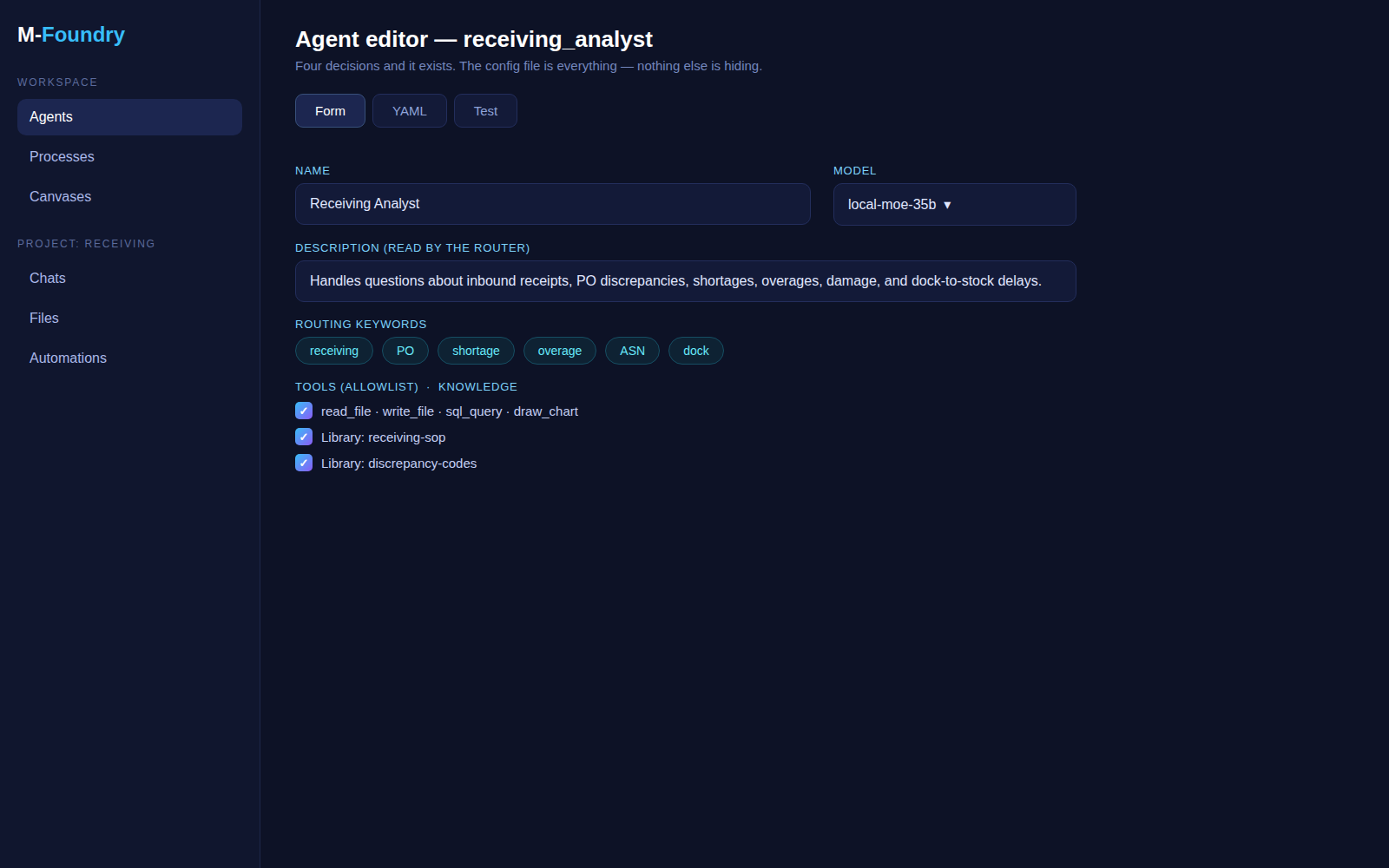
Any agent-plus-prompt can be stored as a process and fired without a human at the keyboard. The obvious first process here is the morning sweep: every day at 06:00, review yesterdays receipts, flag exceptions over the SOP thresholds, and write the summary back to the project. Setting it up is the prompt I’d have typed, saved with a schedule — cron or a simple interval — and each run leaves are playable log: what the agent saw, what tools it called, what it produced. When a run looks odd, you replay it and look, which beats wondering.
Processes can also require a human. Flag the process for approval and the agent pauses mid-task — say, before writing a discrepancy report that will go to a supplier — and I approve or reject from the chat, with a comment the agent actually adapts to. The paused state is check pointed to disk, so the approval can arrive hours later, or after a restart, and the run picks up where it stopped.
The Webhook Option
The schedule covers the routine. The webhook covers the world’s own timing.
A process can be triggered by an inbound webhook instead of a clock —and the webhook can carry files into the project before the run starts. That last clause is the useful one. Our carrier posts a delivery-status file when their overnight batch closes; the warehouse system can POST a discrepancy extract the moment a receiving door closes out. Point those at the process's webhook URL and the pattern inverts: instead of a 06:00 sweep hoping the data has arrived, the arrival of the data is what starts the run. The file lands in the project, the process fires, and the exceptions are waiting in the summary before anyone knew there was something to look at. Event-driven monitoring with the same agent, the same prompt, and the same re-playable log as the scheduled kind.
The harness supports MCP so if the data is available in the WMS and the vendor has provided an MCP it could be used to fetch the discrepancy information, or if we put the information into an internal data warehouse we could pull it from there.
The Canvas: Where the Results Live
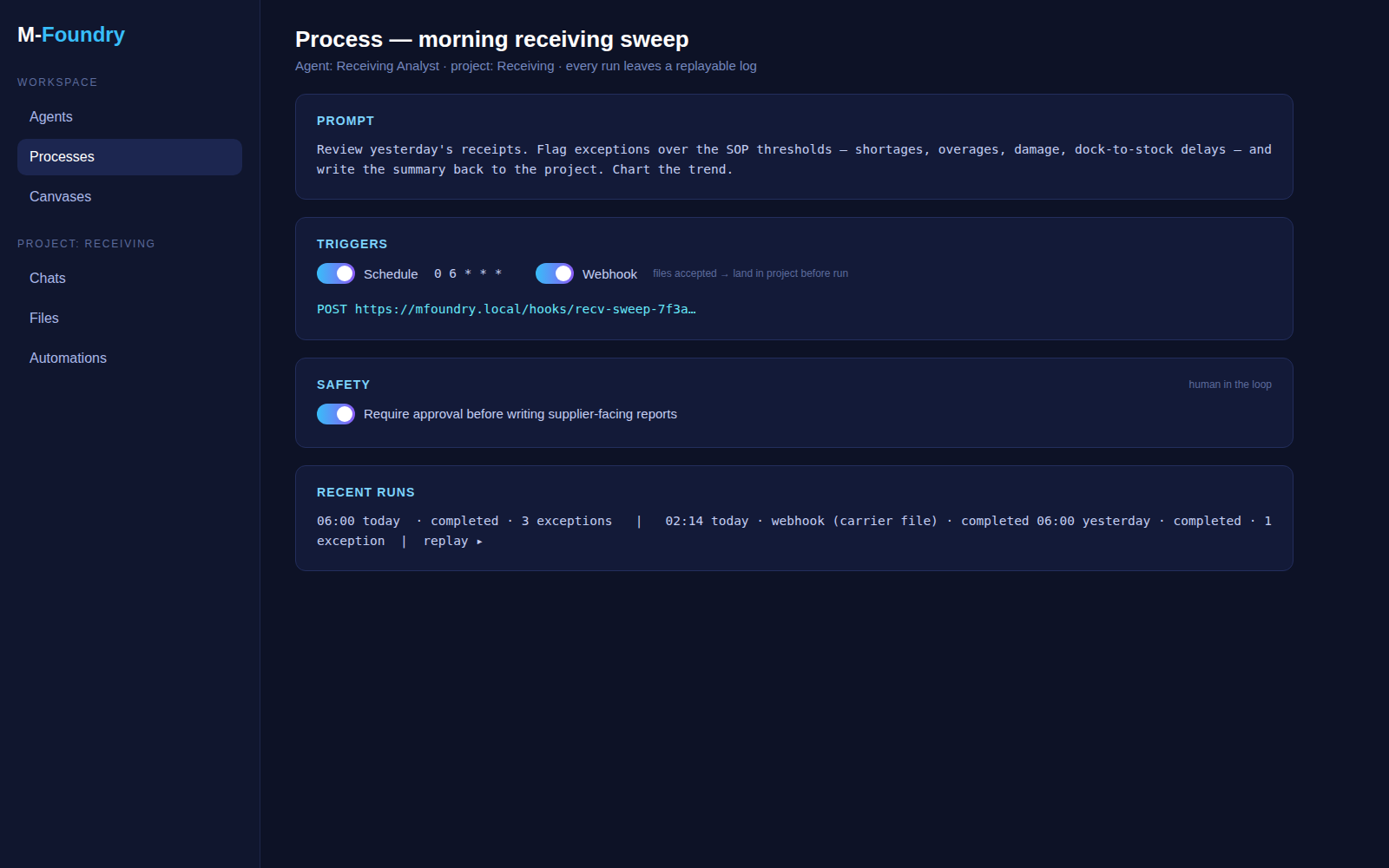
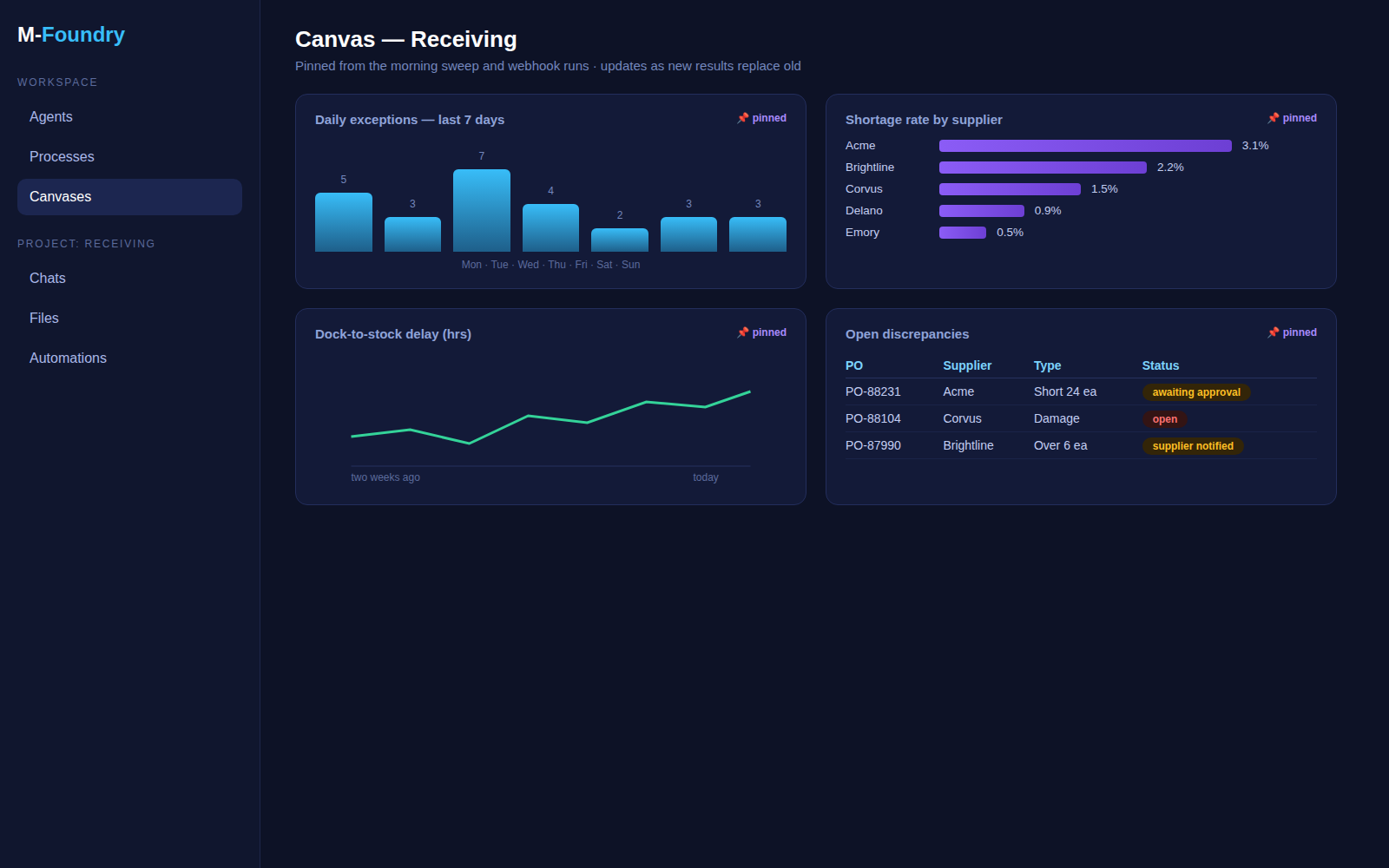
Each process run presents its results on an ephemeral canvas — the same surface the analyst uses in a deep dive, so a scheduled run’s output looks exactly like work done by hand. But charts and image scan also be pinned to persistent canvases: boards that stay, and that update as new pinned results replace old ones.
So the Receiving project grows a canvas: the daily exception count trend, the top-five suppliers by shortage rate, the dock-to-stock delay chart, the current open discrepancies table. The morning sweep and the webhook runs keep feeding it; the analyst arranges it once and glances at it every day. It’s not a BI deployment — it’s the agent’s actual output, pinned where the team can see it. A living dashboard, assembled from finished work.
What This Adds Up To
Step back and look at what just happened. An analyst — not a developer —created a specialist agent with a form, chose where its brain runs,tested it in a real workspace on a real file, automated it on both a clock and an event, put a human approval gate exactly where one belongs, and ended up with a dashboard that maintains itself. No per-agent code, no vendor implementation project, and every step of it visible in transcripts and run logs.
That’s the first group of features. The next posts go deeper into how agents come to know your business — knowledge libraries and a memory that learns from corrections — and into the plumbing underneath: the thin harness, context management, and the safety rails that make giving an agent hands something other than reckless.
As always: questions, suggestions, and criticism are welcome —especially from anyone whose receiving dock looks like this. Ideas rarely improve in isolation.
More soon.
Enjoyed this? Get the next one.
Occasional emails when I publish new writing on SQL, machine learning, GenAI, and supply chain. No noise.
$ subscribe — new posts & updates, no spam
Double opt-in — you'll confirm by email. Unsubscribe anytime via the link in every email. No spam, ever.